Not long after setting up my Twitter account, I downloaded and started using TweetDeck, and a great client it is too.
However, having this great PC client did have a few downsides. Either the little pop-up notification would appear just as I wanted to click something underneath it, or something so interesting would pop up that I would immediately click on it. And then I’d be distracted, time would fly and I’d be doomed to get nothing done. Plus, if I was out seeing a client, there would be such a queue of updates waiting to be read that I’d fall so far behind and just skip a day. Or two.
But then they released a beta of TweetDeck on Android.
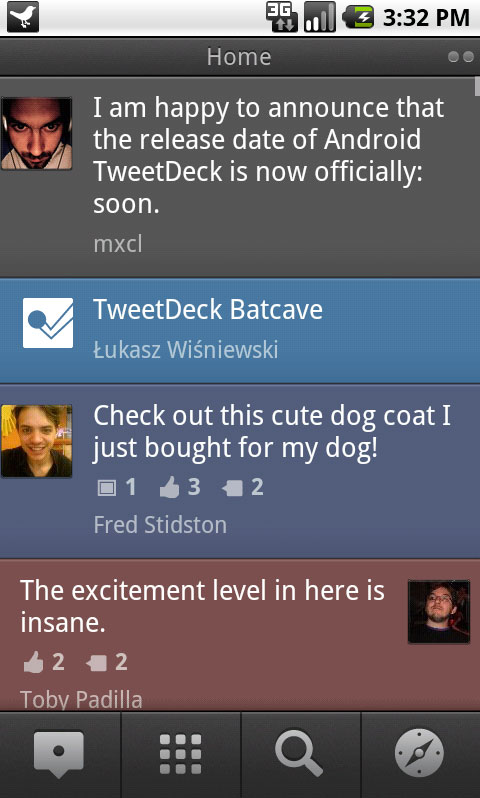 And despite that beta status, I just had to go and install it on my lovely HTC Desire.
A couple of little niggles with it, but I have to love it for…
- Lovely look and feel
- Seamless feed of Twitter and Facebook
- It remembers where I get to, so when I open it up again I don’t have to find the last thing I read
- Far nicer than the standard Android / HTC apps
- Easy to tweet photos and update location
- Easy to post to Twitter and Facebook at the same time
- Wherever I am I don’t have to stare at those crawling status bars as I turn poorly PCs into healthy PCs, I can instead tweet and be tweeted.
Go on, tweet yourself, come and join the beta.
(apologies for spangworthy pun)

A Microsoft Certified Professional with many years of large corporate experience and training, he now focuses on helping small businesses make the most of their IT.
- Font Test - March 30, 2022
- An open letter of apology to Anna Firth - November 8, 2019
- My story – being a mum to a colour deficient son - September 9, 2019