It’s bad enough I have to have people in Google+ circles, why do I have to have their bloomin’ birthdays in my Google Calendar? This isn’t Facebook you know!
Sorry, bad news everyone – this doesn’t work anymore…
Update 8th January 2015: Google have removed Birthdays from the list of “interesting” calendars in the More tab, so these instructions no longer work 🙁
…but here’s some good news!
Update 25th February 2015: Looks like Google are making changes – good news for google calendar birthday haters?

If you’re building up a collection of contacts in your Google+ circles and you use the Google Calendar, you’ve probably noticed their birthday’s appearing in your diary.
We all know (don’t we?) how easy it is to hide a calendar by clicking on the little colour box in the sidebar key, but what if you want it removed more permanently? It’s not as easy as it should be.
How to remove Google+ birthdays from your calendar
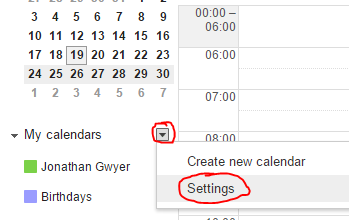
1) Click on the little dropdown arrow next to “My calendars” and click “Settings”
2) On the next screen we see the list of your calendars.
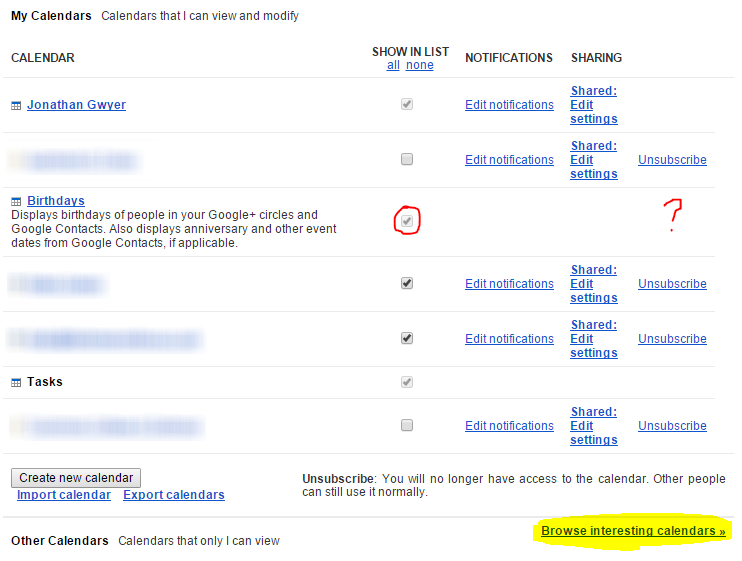 Hang on, how come “Show in List” is greyed out and there’s no Unsubscribe link? That’s a bit cheeky!
3) Look for that little “Browse interesting calendars” link at the bottom and click it.
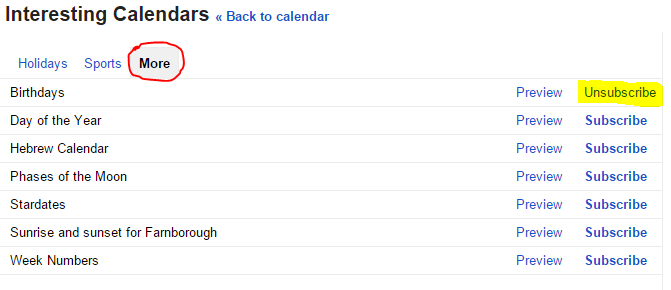
4) Click on the “More” tab under “Interesting Calendars” and now the “Unsubscribe” link appears for Birthdays. Click it and wave it goodbye!
I’m sorry Google, you’re going to have to try harder to stop me being a grumpy old man.

A Microsoft Certified Professional with many years of large corporate experience and training, he now focuses on helping small businesses make the most of their IT.
- Font Test - March 30, 2022
- An open letter of apology to Anna Firth - November 8, 2019
- My story – being a mum to a colour deficient son - September 9, 2019