We all have them – perhaps I’m one of yours – those Facebook friends who say just a little too much. I don’t mean those “Too Much Information” people, more the “Too Many Updates.”
But while they may sometimes be annoying, you still want to be friends with them. Or at least, you don’t want to be so cruel as to unfriend them. After all, they may realise and get the hump!
How to remain friends while making them quieter…
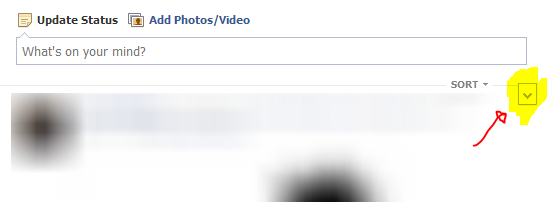
Next time you see a post from them in your timeline, move your pointer up to the top of the post, and move over to the right. A little drop down arrow box will appear. Click it:
Now a small menu will appear – click Hide:
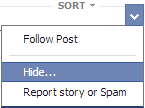
So now you’ve hidden that post. Sometimes that’s all you want, just to kill off that one annoying update that everyone is commenting on but you just don’t care. If you’ve accidentally clicked the wrong one, click the Unhide link.
But we mean business here, one story isn’t enough. We’ve got two new options linked where that story used to be, and we’re going to click the first – Change what updates you get from X:
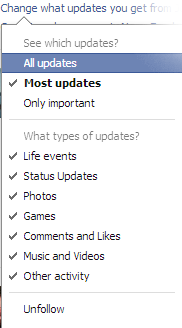
Now you can remove certain types of updates or select Only important which uses our old friend Edgerank (see Facebook Pages are NOT disappearing completely from your feed! among others) to pick the best stories to show us.
But what about that other tempting link – Organise who you see in News Feed?
If you follow that option, Facebook will come up with suggestions of people who you rarely interact with to move into your “Acquaintances list” – you’ll see less of their updates too.
In fact, all this talk of friend lists, I can feel another blog post stirring in the old imagination…
![▇▇▇▇ [1113]](/wp-content/uploads/2013/06/6723758731_f8a9f8c7ab5.jpg "▇▇▇▇ [1113]")

A Microsoft Certified Professional with many years of large corporate experience and training, he now focuses on helping small businesses make the most of their IT.
- Font Test - March 30, 2022
- An open letter of apology to Anna Firth - November 8, 2019
- My story – being a mum to a colour deficient son - September 9, 2019