If you’re using Facebook pages (why not?) then here’s my little tip of the day…
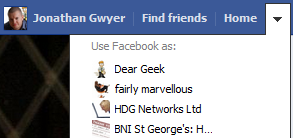 In the top, right-hand corner of your Facebook screen there is a drop-down arrow.
When you click it, you are given a list of page(s) that you can “Use Facebook as:”
Select the page of your choice and, once it has loaded, click the Home link (top, right-hand corner again).
Now you are seeing your news feed as if your page was a normal person. All the news stories from the pages that your page likes will be listed.
Ok, that will probably make more sense when you see it for yourself!
This is a great way to find things to interact with – Like or Comment on other pages using your page’s identity and get your name seen by more people.
Just click that magic arrow again to find your way back to using Facebook as yourself.
Remember though – don’t spam those pages!

A Microsoft Certified Professional with many years of large corporate experience and training, he now focuses on helping small businesses make the most of their IT.
- Font Test - March 30, 2022
- An open letter of apology to Anna Firth - November 8, 2019
- My story – being a mum to a colour deficient son - September 9, 2019